
Sunday, March 28, 2010

Fix-It Friday #48

I love editing photo's, so I figured I needed to start joining in on the photo editing on...

Here is the original photo they gave (adorable girl):
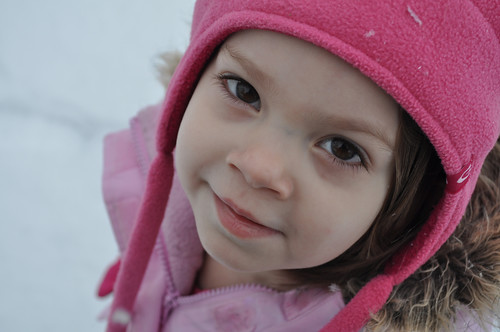
ihrtfaces


Here is my fixed version of the photo:

ihrtfaces clr pop
The program I use to edit photos is Photoshop Elements 6. The following are the steps I took to edit this photo:
- adjusted levels a tad to brighten up
- I adjusted color for skin tone
- opened up color curves and increased midtones (to lighten the photo)
- I cloned out the snow flake on her hat. It was a bit of a distraction to my eye.
- used dodge/burn to bring out the eyes
- I also used coffeeshop actions, perfect portraiture but I turned off color pop and vignette and adjusted others to my liking. *side note, coffeeshop actions are awesome if you have photoshop elements. Must go to her site and check out all that Rita offers.
-to top off the photo I used color pop from the Florabella action in the color & haze set. I adjusted the settings there as well to my liking.
- just sharpened a tad for the web and thats it.

Here is my black/white version:
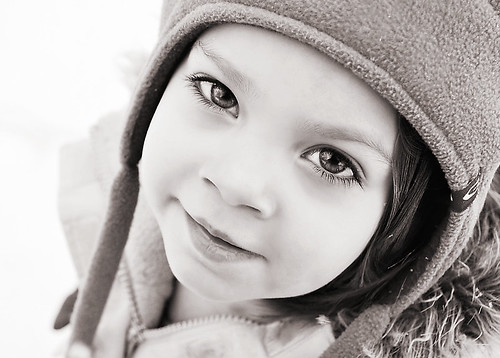
ihrtfaces blk & white
I converted my edited version to black/white and then I like to add a tad brown to the hue and a tad navy blue. Pretty simple.

I was having a bit of fun, so here is a bit of an urban feel of the photo I did using cosmopolitan of Florabella actions, adjusted to my liking again:

ihrtfaces cos

Don't judge to harshly, first time here. Love the practice. I had fun! :)

Monday, August 18, 2008

Hogle Zoo


When Lurlyn and Leify were in town we went to the zoo and I got tons of great pics. This one was one of my favorites cause Aubriana loved riding the carousel. I also love the new papers I bought from Catscrap to go with the pics. I can't wait to scrap more from the Zoo.

Stats:

I scraplifted the layout by Lena Brandenburg. Everything is from Creashens Tamed Kit at Catscrap. I also used Danielle's Worn Photo Overlays also at Catscrap.

Sunday, August 17, 2008

8th Anniversary Page


We had such a blast on our 8th Anniversary this year that I had to use a fun kit with cool colors to display our picture. We took fun photos of eachother through out the trip but I'm not that happy with them. The shadows on our faces really bum me out but oh well, its the memory that counts right? I'm still learning on my new camera and realize I need some fill flash in the harsh sunlight to lighten the shadows a bit... I'm working on figuring that out.

Stats:
Most everything on this page is from the Tutti Frutti kit by We Are Storytellers. Love the kit, so many fun elements and papers to choose from. The template I used was from Kay Miller from Sweet Shoppe Designs (SSD).

Friday, July 11, 2008

Unforgettable

I tried to keep this page as simple as possible because the pictures really make the page in my opinion. My daughters birthday was such an amazing experience that I wanted to express that somehow through my page. Don't know if I did, but I love it.

Stats:

Everything here is from sweetshoppedesigns.com.
Glitter Alphabet & papers are from the kit, Wish on a rainbow.
I also used blankcanvas (template 4) by mmartin.
The shimmerdust is by kcroninbarrow.

Wednesday, July 2, 2008

Sketch Challenge

Thedigichick.com has a great forum for when you are having creativity difficulties. You can try one of their sketch challenges, which I enjoy because I'm not good at my layouts. I love coming up with my own style but the layouts are a struggle for me. Here was my take on the challenge. View challenge HERE.

Stats:

Paper: Shabby Cottage and She's So Charming by Holly designs from The Shabby Pickle. All elements are from the Shabby Cottage.

Thursday, June 26, 2008

My New Site

I created this site mainly for me. I wanted to expand a little more on my hobbies. I'm really into everything digital. I've really enjoyed Digital Scrapbooking because its convenient for me at the moment. I love the fact that it looks close to the real thing and love to play on my computer so its a win win. Plus, I have an adorable baby girl that I have been taking millions of photos of and its easy to scrapbook them. I've actually never really been into scrapbooking, more card making because I use to sell Stampin' Up! (which I LOVE LOVE their products). Now that I'm on the road with my hubby, the space is just not permitting. I will continue that when we have a house to live in within this next year, but for now I'm enjoying the digital side.

Another hobby I've taken up is Photography. I've actually always loved taking pictures (who doesn't) and just got a Nikon D60 DSLR camera! Yeah! I'm in love with it. It takes amazing pictures and makes me look better then I am. I'm excited to expand on my creativity in both photography & scrapbooking.

This blog was created by ME using paper & elements from the hello blue sky kit by Laura Ping designs from Polkadotpotato.com.

Boring to Great Black & White Photos

I love taking pictures and seeing how well they come out. I love even more being able to play with the photo to make it look how I really want it to. Right now I've been working with Photoshop Elements 3.0. I could upgrade to 7 but why bother when I finally get use to using 3. I love all my options and just playing around.


Lately I've been trying to make my Black & White photo's pop a little more. Usually when you convert your photo to black and white, it looks kinda boring. I've found tutorials online showing how to pump up the photo using curves, but you have to have PS-CS3 (which is too large and way too expensive). So, I began playing around with my levels and I finally found a way that makes me happy with the end result.


Basic black & white conversion. Not bad, but a little boring.


Converted black & white using levels. Adds a little more life to the photo. I love it!


Stats:
The above photo was taken using my Nikon D60, Lense: AF-S Nikkor 55-200mm 1:4-5.6G, shutter: 1/200, aperture: F6.3, exposure mode: aperture, exp.+/-: -0.3.
Edited by Photoshop Elements 3.o using Gradient Map and Levels.